
Digital Twin Bridging: Enabling Virtual Worlds to Manifest in the Physical
Adam Dooley; Mihai Penica; Sean McGrath; William O'Brien; Mangolika Bhattacharya; Eoin O'Connell
Abstract
Virtual Reality (VR) technology is a powerful tool in the ongoing quest to address global challenges. VR's immersive and interactive nature enables more engaging and effective solutions for addressing real-world technical challenges and improving the overall human experience. It offers an innovative approach to simulate real-world scenarios within a virtual realm. The work being presented bridges the gap between the physical and the virtual by crafting a virtual environment that empowers users to interact in real time with critical real-world issues through the tool of virtual reality. The exhibited work offers more than just technological innovation; it immerses users in an intricately replicated virtual environment that seamlessly mirrors an actual building allowing the user to interact within the virtual domain and control the physical domain. Through this convergence of technology and reality, a glimpse of the future where advancing VR technologies can open doors (physically and virtually) delivering novel methods of interacting with and managing our surroundings.
Introduction
The study of Virtual Reality has been something that researchers have done for years, yet in recent years the world of virtual reality has grown rapidly. This piece of work allows the undertaker to delve into this field and experience the nature of virtual reality. The student will learn a great deal regarding virtual reality with the given work as they must learn how to design, use, and interact with a virtual environment all of their own making.
The purpose of this piece of work is to allow the user to understand and come to terms with virtual reality and how it functions. The user is tasked with the creation of a virtual environment such that a user can use a virtual reality device and be capable of interacting and navigating the virtual environment with ease. The user is responsible for designating a given software and learning the software to a degree that they can develop the virtual world to a great deal of precision such that it feels immersive enough to feel like the real environment in which it mimics. This level of design and control of the virtual environment is what dictates the students' understanding of the software and what is the decider in how immersive the virtual environment becomes.
Further to the creation of a virtual environment, the user is assigned the task of the implementation of a real-world device which can be controlled through the virtual environment. This device will create a bond between both the real and the virtual world as the user can control both from a single environment. The student must produce a means of making the device remain consistent between both environments, yet still provide the user of the device to have full control over the device from both environments. This implementation adds a complexity to the work that upon success adds a greater level of control to the user.
This paper acts as a scope into the process of the given work, the approach to completing the work and what practices best suit the given title to return optimum results.
Literature Review
A.) Virtual Reality
Virtual reality (VR) represents a computer-generated 3D environment, referred to as a virtual environment, where users can navigate and interact in a way that simulates at least one of their five senses [1]. Key activities within a virtual environment include navigation and interaction. Navigation involves the user's ability to move freely within the virtual space, fostering a sense of immersion. Interaction, on the other hand, encompasses the user's ability to engage with the environment and manipulate virtual objects. Achieving both navigation and interaction has evolved significantly over time, with developers now integrating technologies to enhance user experiences.
In the early stages of VR development, head-tracking technologies facilitated navigation by tracking the motion of the user's head. However, achieving interaction was a challenge. Advancements in technology have now made both activities more achievable. Head-mounted devices (HMDs),equipped with screens per eye and external cameras and sensors, have become a common method for achieving virtual reality. Handheld devices with built-in sensors further enable users to navigate and interact by tracking hand movements[2]. This integration of technologies ensures a seamless and immersive virtual experience. An essential consideration in designing VR experiences is the incorporation of human senses. While sight is the most integrated sense, sound and touch play crucial roles in enhancing immersion. The implementation of a 3D soundscape and the use of haptic feedback equipment contribute to a more holistic sensory experience, making the virtual environment feel increasingly realistic. Here's an example of virtual-physical bridging in Figure 1, depicting a virtual rendering of a physical building.
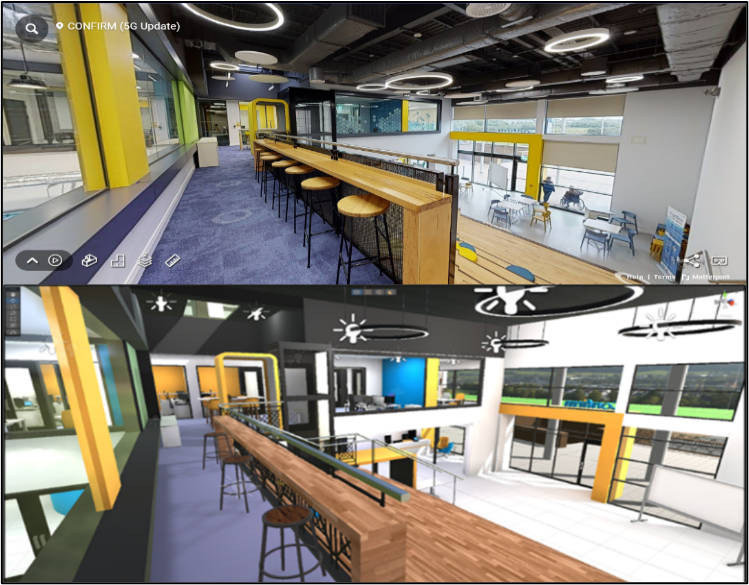
Figure 1 - Confirm building in Matterport Vs virtual
B.) Internet of Things
The Internet of Things (IoT) [3] has witnessed significant growth as more devices become connected to the internet. Coined in 1999 [4], IoT refers to embedded devices with sensors, software, or other technologies connected to exchange data over the internet. In 2021, there were 12.2 billion connected devices, surpassing the global population by 53% [5]. The evolution of IoT can be attributed to various factors, including access to affordable sensors, improved connectivity, cloud computing, and artificial intelligence. Modern sensors, coupled with advancements in internet protocols, enable developers to create and use IoT devices seamlessly. The surge in IoT devices is also fuelled by the integration of consumer AIs like Alexa, Siri, and Cortana, enhancing device functionality [6]. The rise of affordable IoT devices has given birth to smart devices [7], that integrate intelligence into everyday items. This surge has revolutionized homes, making automation more common. Through integration with platforms like Amazon's Alexa, users can control smart devices with voice commands, ushering in a new era of intelligent living.
In summary, the evolution of VR technologies and the proliferation of IoT devices and smart technologies are shaping a future where the virtual and physical worlds seamlessly integrate, offering users unprecedented levels of immersion and control.
Specifications
A.) Hardware
For this piece of work, two separate hardware designs are going to be in use. The use of the two separate designs will show a contrast in their operation and highlight how each works. This section of the paper will be broken down into subsections to analyse the different types of hardware to be implemented into the work. To try and control a real-world device from within a virtual environment while also achieving a real-time response, the best means to do this is to design a circuit to reach these goals. In this case, this will be achieved by using an ESP8266 [8] in access point mode. This will then allow the host PC to connect to the ESP8266 and be able to toggle on and off an LED using triggering two separate IP addresses. This can be achieved using the GET and POSTs functions within a C# script and results in the LED changing state in around 100ms. The ESP8266 Wi-Fi Module, a self-contained system-on-chip (SOC) with an integrated TCP/IP protocol stack, enables any microcontroller to connect to your Wi-Fi network. All Wi-Fi networking functions may be delegated to the ESP8266 from a different application processor or application host. an inexpensive board with a growing community is the ESP8266 module. This use makes it perfect for this work, as it provides both the wireless and the simplicity requirements of the circuit needed for this work. The simpler the circuit, the quicker the toggling speed, and accompanied with the wireless capabilities, the ESP8266 is the best fitting controller for this task.
For this work, the ESP8266 is used in access point mode [9]. This means that a user can access the ESP8266 and use it as a web server. The ESP8266 would be set up to control an LED. This LED would be attached to one of the GPIO pins, allowing the LED to be toggled on and off. This could be achieved through the webserver of the ESP8266. The ESP8266 would be equipped with two main web pages, one for the LED on function, and another for the LED off function. When either of these pages is accessed, the LED function would be triggered, and the LED would change to the correct state.
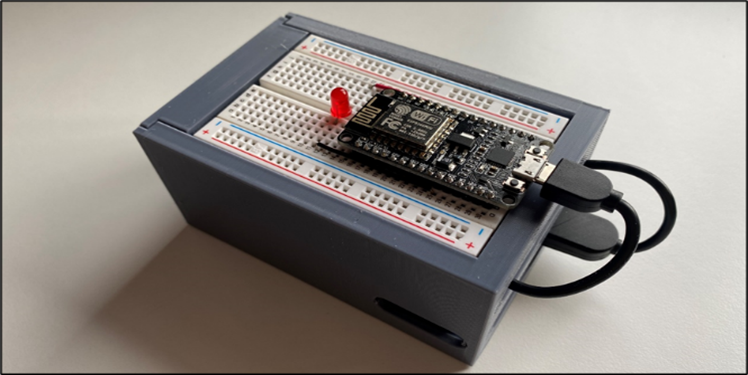
Figure 2 - LED Circuit and enclosure.
The other method of turning on a real-world device for this work was using an off-the-shelf smart device. This method would allow for a quick and easy solution to the problem at hand, with the use of minimal to no code to achieve this. In our case, the device in question is the TP-Link Tapo L510B. This is an inexpensive bulb designed for smart home applications that is also designed with If-This-Then-That (IFTTT) [10] integration.
The L510B is designed with integrated IEEE 802.11b/g/n Wi-Fi protocol [11] making it simple to use the bulb with any network. The bulb is set up with its own “Tapo” application, making the setup quick and easy. The custom network credential is entered in the app and the bulb is then applied to connect to the hotspot network as needed by the user. The bulb also has IFTTT capabilities making it simple to set up a webhook task and control the bulb. The bulb is controlled using an IFTTT where a webhook is triggered by a script which in turn toggles the LED bulb. The result is the functioning control of a real-world device at the click of a virtual button.
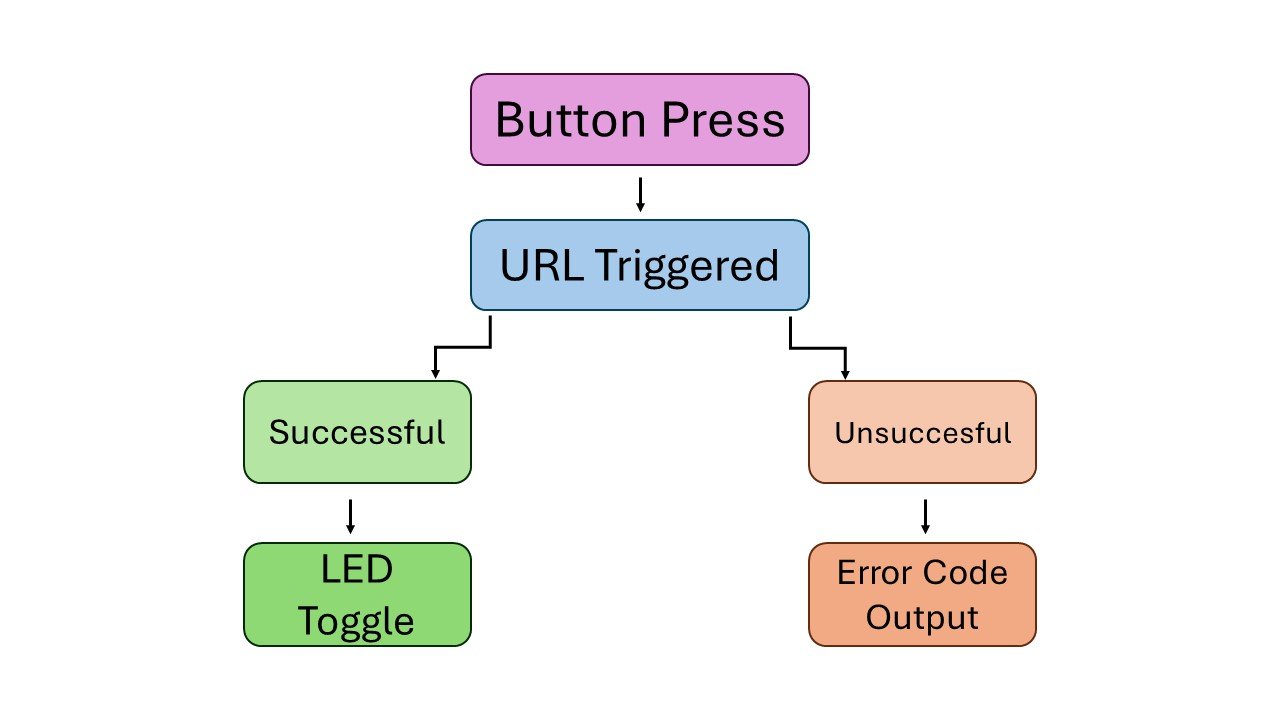
Figure 3- ESP8266 Flowchart.
B.) Software
After much research, it was decided that the Unity game engine [12] would be used instead of the Unreal engine. Unity has a range of VR tools and packages built-in, making native use of a VR project with Unity a straightforward process. To create the realistic structure of the Confirm building, advanced 3D modelling software would be required to achieve this. This is where Unity pro-builder was used. Unity pro-builder is a built-in software within the Unity game engine that allows the advanced placement of 3D objects within a virtual environment within Unity. The pro-builder tool provides the user with a range of extra 3D objects with a range of added controls to allow the user to get greater details with their designs. It also creates 3D objects with the required physics pre-attached to save the user from having to apply such colliders themselves
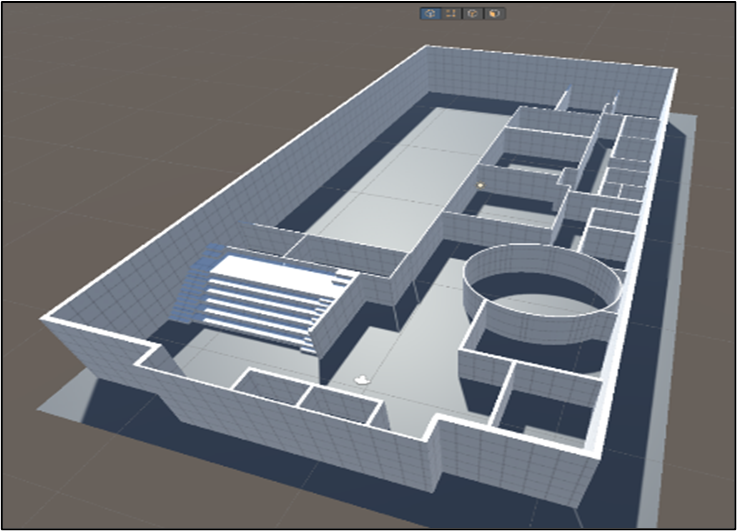
Figure 4 - Sample workflow from Unity Engine.
Unity Plastic SCM is a version control and source code management technology made for real-time 3D game and real-time game production. Its purpose is to improve team collaboration and scalability with the game engine. It provides faster operation with large files and binaries and optimises programmers' and designers' processes. This software proved to be vital to the work. A solution was needed to be able to bring this work around portably and to efficiently move it between multiple devices. Plastic SCM allows for a piece of work to be pushed to a repository and cloned into much like GitHub, making any piece of work on the repository portable
C.) Connectivity